Jake Buck
Mouse Locker
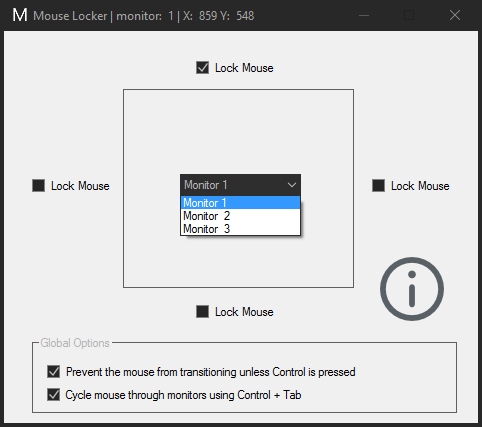 Mouse Locker is a program that allows you to control mouse transitions across multiple monitors. You can choose which display edges will stop the mouse per each display, a feature missing from other programs I found. That means you can have the mouse move seamlessly between two lower monitors while stopping accidental transitions to your topmost monitor(s). Other programs would restrict mouse movement at each border, which I found to be a nuisance.
The program starts minimized, double click the icon in the system tray to configure it.
If there's enough interest I will institute sticky (delayed) transitions, so you won't have to hit the hotkey to move between monitors but you woulds still have some extra transition protection.
Download Mouse Locker
PSP Homebrew Sorter
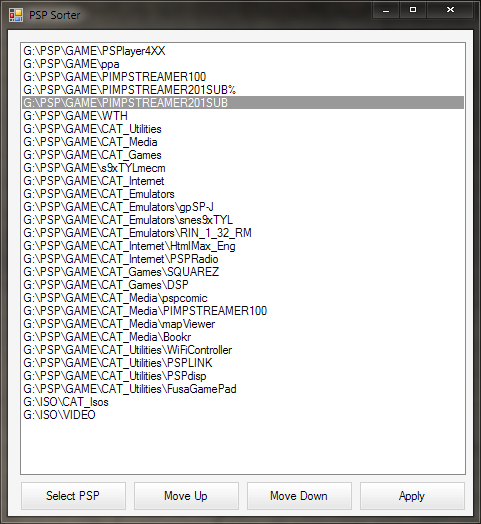 A simple little project I undertook to help organize all the homebrew I had on my PSP. It does this by loading a list of the homebrew on your PSP, letting you organize the entries into the order you want them to show up in your PSP’s game menu, and then changing the date modified attribute of those folders to correspond with the new layout. Connect your PSP to your computer via USB, hit the “Select PSP” button, select your PSP, use the “Move Up” and “Move Down” buttons to reorder the list, and finally hit “Apply” to save the list to your PSP.
Written in VB.NET, requires a current version of Microsoft’s .NET framework to run.
Download: Program | Source
If you want to mess around with the source but don’t have Visual Studio, you can get Microsoft’s Visual Studio Express packages free.
View Page: 1 2 3 4 5